|
Fast Parcel Processing
Time Saving Tools Maximize Your
Package Output

Puts You In Control
of Your Shipping Volume!
 takes just seconds to ship
each and every package. Check our videos on YouTube that shows that great CPS shipping speed. takes just seconds to ship
each and every package. Check our videos on YouTube that shows that great CPS shipping speed.

Click here to see CPS on YouTube
has automated ways to save you
time and money on each and every package. Even though CPS
processes all carriers supported in the fast possible manner,
CPS also meets special carrier business rules and requirements
for the use of high volume shippers tools from UPS and
USPS.
In addition to special high volume
carrier options. CPS has many features and tools that allow the
high volume shipper to process many packages at much higher
rates of speed than most shipping systems on the market today. CPS can even be set up to ship packages without
any manual interaction. And CPS does all this while still
automatically deciding the best way to ship each and every
package according to your company's business rules.
 High
Speed UPS®
Processing High
Speed UPS®
Processing


is a UPS Ready®
shipping software solution for efficient high volume businesses
though meeting special UPS business requirement and rules.
CPS fully supports UPS's vision of synchronized
commerce as the next evolution of global commerce in which goods,
information, and funds are seamlessly connected to benefit
customers worldwide.
Click
here to learn more...


 High
Speed USPS®
Processing High
Speed USPS®
Processing

Optionally use USPS®
eVS®
for even more savings for high volume shippers. Use
advanced domestic post office
services to their best advantage by using CPS along
with its optional USPS Electronic Verification System (eVS)
service.
Click here to learn more...
Shipment
Processing
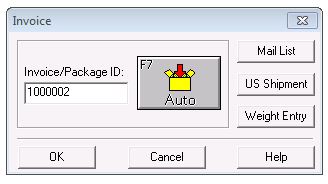
For example, see how easy it is to
process a multiple piece shipment to a single location. When
entering a package, you have the choice to just press OK to ship
a single package or select to process a multiple parcel shipment
right from the first entry field in CPS.
For multiple package shipments, all
you need to do is tell CPS if the packages are all the same or
different weights and how many there are in the shipment. Then,
the automation starts.
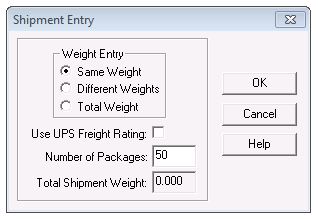
If all the parcels are the same
weight and you only know the total weight, CPS can automate this
for you too.
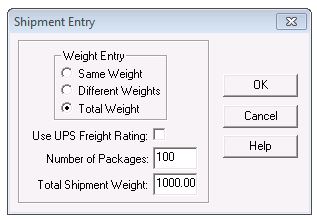
Once you enter the shipping
information, the only thing left is to stick all the labels on
the packages and send them out the door. CPS does all the work
for you!
The
Automator - Hands-Free Shipping
With the CPS Automator, shipping
becomes a hands-free operation. The Automator imports and
processes package data, prints shipping labels and
documentation, then exports data about the shipment - all
without any intervention. Shipping becomes a hands-off
process! This works especially well in areas where security or
user errors are of the utmost concern.
If you are interested in The Automator,
please contact one of our shipping software specialists. They will
be glad to give you the necessary requirements to make this method work
for you. This option is available in every CPS package.
 |
Send data directly from your order
or other system to CPS
|
|
|
Handles International parcels and
commercial invoice items
|
|
|
Extremely fast package processing
|
|
|
Supports auto-processing of
separate first and last name fields
|
|
Background Importing/Exporting
- Add Packages as You Work
Background Importing and Exporting
moves data to and from an external data source automatically.
The shipping system operator just continues to process parcels.
Imported data is ready to be used immediately, and exporting is
so fast it is invisible to the shipping system operator.
Background Importing and Exporting is very versatile, extremely
stable, works in a multitude of environments and is easy to set
up. Background Importing and Exporting uses easy to work with
text files, and you can adjust CPS to use the data in your file.
|
|
No additional user steps needed to
import or export data
|
|
|
Keeps your shipping data in a
"holding" file until you are ready to use it
|
|
|
Included with every CPS package
|
|
International
Multi-Piece
CPS makes
shipping orders of more than one box to a single international location
quick and easy. For international orders, you just tell CPS how many
boxes are in a shipment, give CPS the commercial invoice information,
and you're set.
|
|
Prints
international shipping labels, commercial invoice, certificate of
origin and USPS customs forms. |
|
|
Fast
international shipping with your choice of UPS, FedEx or the US
Postal Service. |
|
|
Stores
product data for quick commercial invoice creation. |

See How Increased Customer Satisfaction
Solves Your Shipping Problems...
|